Compact thermal invoice
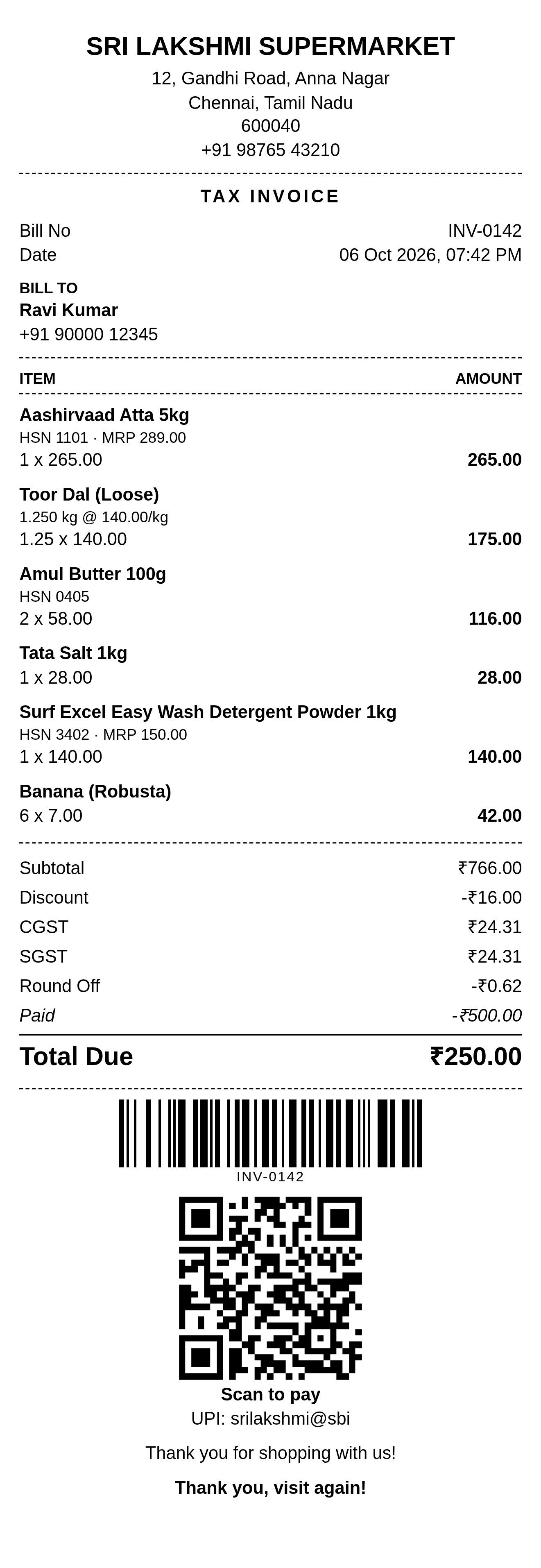
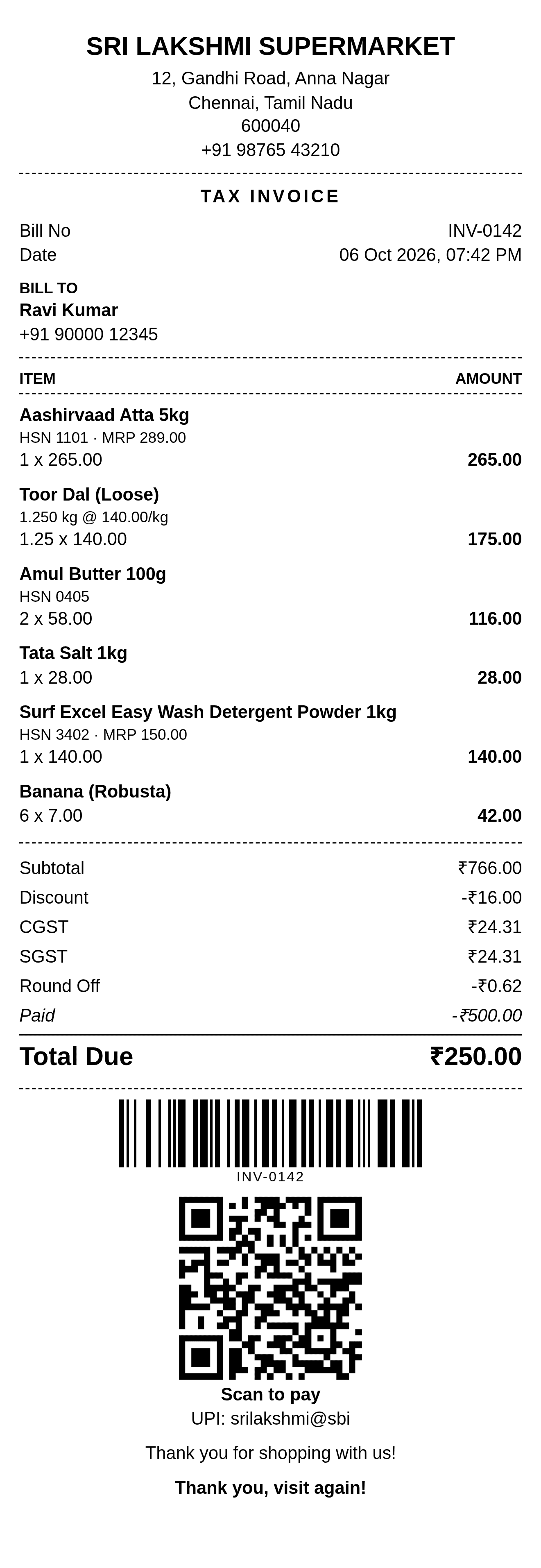
A 4-inch design reference with item amounts, tax lines, a payment adjustment, barcode and sample payment QR code.
 My Inventory Items
Thermal printing resources
Explore compact invoice and paid receipt formats, choose the right print width, and check every total before handing a bill to your customer.
4-inch source designs · Downloadable PNGs · Printer manufacturer references
Thermal printing produces compact transaction documents on a compatible printer. Direct thermal printers use heat-sensitive paper. The document still needs a clear reference, legible item details and totals that match the transaction.
The invoice format records billed items and balance due. The paid receipt format records payment received. Use the document that matches the transaction stage, and keep payment status separate from printing status.
Formats, paper and printer setup
Invoice format
Explore a 4-inch thermal invoice preview, essential billing fields, compact item layouts and a worked check of discounts, taxes and balance due.
Read guide →Receipt format
Review a paid 4-inch thermal receipt preview with payment method, cashier, item rows and an explained tax-inclusive total.
Read guide →Paper widths
Compare nominal thermal paper widths and printable areas. Adapt invoice and receipt layouts without shrinking text, totals or QR codes.
Read guide →Printer setup
Set up the roll, driver, printable width and invoice layout, then test text, totals and QR codes before printing customer bills.
Read guide →Troubleshooting
Troubleshoot blank thermal paper, cropped invoice text, tiny receipts and unreadable QR codes by separating hardware and layout checks.
Read guide →Supplied 4-inch designs
These monochrome PNGs are design references with sample supermarket details. Replace business, customer, payment and QR details in your own working document. Adapt the layout to your printer’s actual print area; these downloads are not editable files or native 58 mm or 80 mm templates.
A 4-inch design reference with item amounts, tax lines, a payment adjustment, barcode and sample payment QR code.
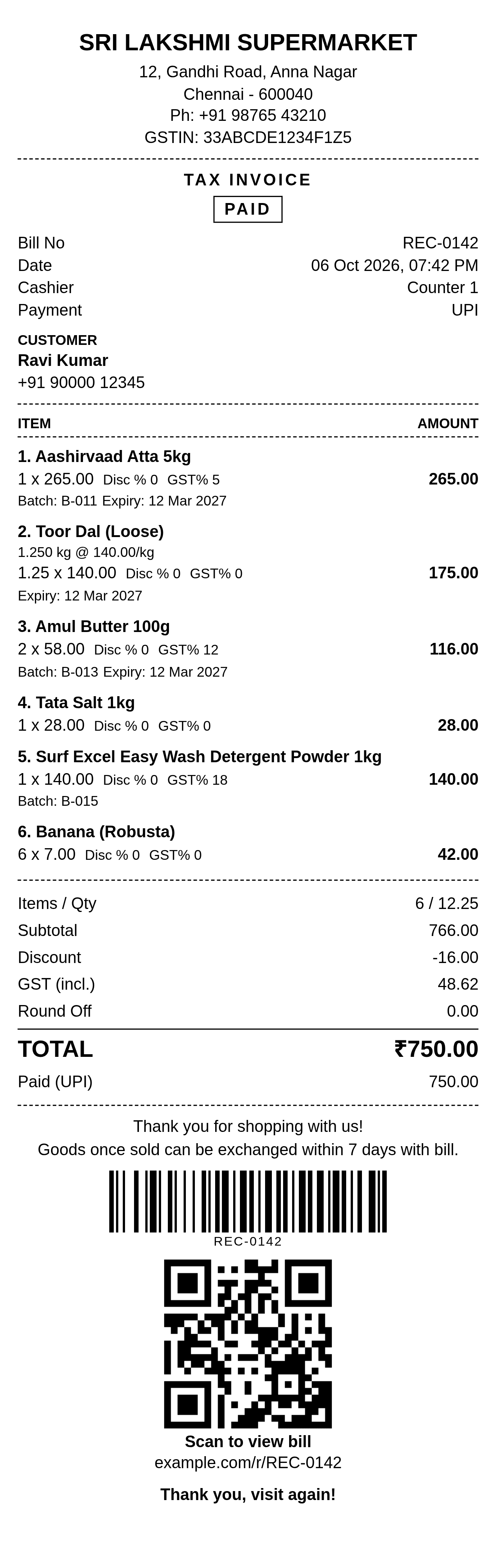
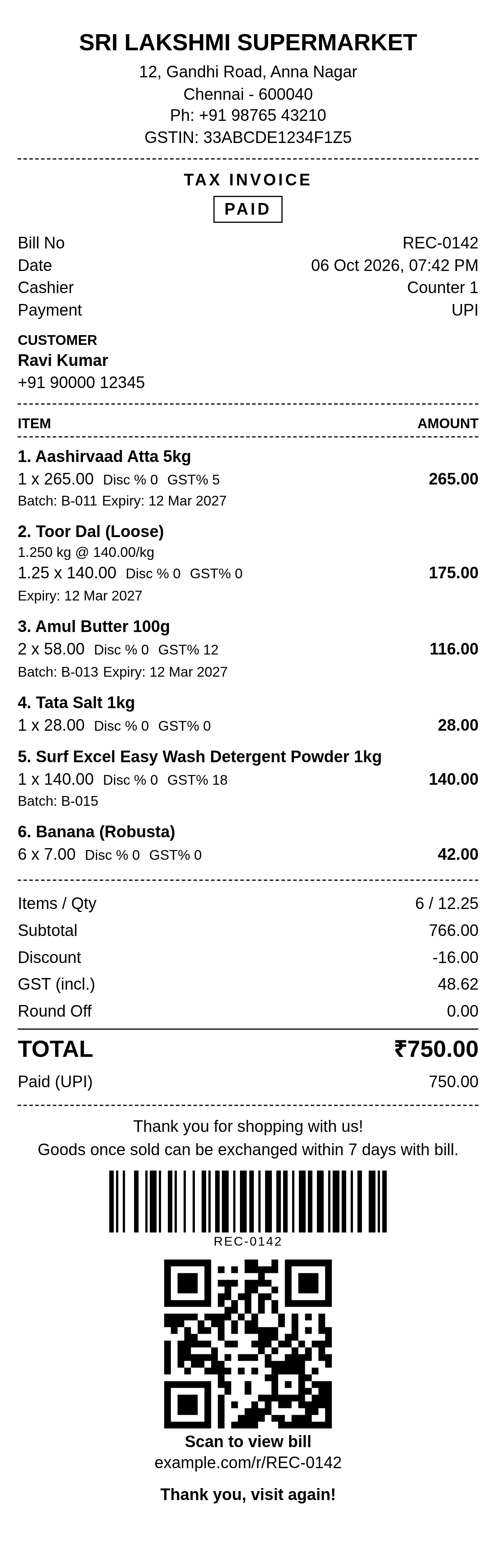
A 4-inch paid receipt design reference with cashier, payment method, batch and expiry details, barcode and sample bill-view QR code.
| Paper format | Layout approach | Supplied preview |
|---|---|---|
| 58 mm | Stack descriptions and quantity rows | Adaptation required |
| 80 mm | Allow more room for aligned amounts | Adaptation required |
| 4-inch (101.6 mm nominal) | Confirm the supported roll and print area | Both source files labeled 4-inch |
Illustrative bill calculations
Both previews show six item amounts: ₹265 + ₹175 + ₹116 + ₹28 + ₹140 + ₹42 = ₹766. They use sample date 6 October 2026. The invoice and receipt have different tax presentation and payment status; compare them as separate design examples.
| Item subtotal | ₹766.00 |
|---|---|
| Discount | −₹16.00 |
| CGST plus SGST | +₹48.62 |
| Round off | −₹0.62 |
| Calculated charges before payment | ₹798.00 |
| Payment allocated | −₹500.00 |
| Calculated balance due | ₹298.00 |
| Balance printed in preview | ₹250.00 |
The preview leaves ₹48 unexplained. If a different tax interpretation or adjustment was intended, make it explicit and recalculate the bill. This arithmetic check does not validate the sample tax rates or tax treatment.
| Item subtotal | ₹766.00 |
|---|---|
| Discount | −₹16.00 |
| GST labeled included | ₹48.62 (not added again) |
| Round off | ₹0.00 |
| Displayed total | ₹750.00 |
| Payment acknowledged | ₹750.00 |
| Balance after full payment | ₹0.00 |
The displayed subtotal and discount reconcile to the total. The included tax amount needs a separate check against the source transaction; this preview does not establish tax compliance. Its quantity summary mixes kilograms and pieces, so use separate units in inventory records.
Official guidance checked on 11 October 2026. Model-specific specifications should be confirmed against your own printer manual.
This model’s guide distinguishes paper width from printing width: 80 mm paper has a 72.0 mm print area; 58 mm paper has a 50.8 mm print area. These are model-specific examples, not universal dimensions.
Star’s blank-print troubleshooting includes checking that the roll is thermal paper and loaded in the correct orientation. Use the instructions for your own printer model.
Star explains that heat, sunlight, oils and cleaning chemicals can fade or darken thermal media. Preserve a digital copy of records you need to retrieve later.
Thermal printing produces a compact bill or receipt using a thermal printer. Direct thermal models use heat-sensitive paper. The invoice records charges and an outstanding balance; the receipt records payment received. Paper width changes the layout, not the purpose of the document.
Yes. Download the two supplied monochrome PNG design previews for a compact invoice and a paid receipt. Both source files are labeled 4-inch. They contain sample details and QR codes and are not editable templates or printer command files.
The supplied designs are labeled 4-inch, approximately 101.6 mm nominal width. They are not native 58 mm or 80 mm layouts. Reflow text and columns to the actual printable width of your printer instead of shrinking the whole preview until its text becomes unreadable.
A thermal invoice states the billed items, charges, payment terms and any remaining balance. A thermal receipt acknowledges a payment and its method. A paid bill may combine information, but only mark it paid after verifying the actual payment.
The print head and printer margins can leave unprinted space along the roll edges. Printable width depends on the printer model and paper configuration. Read the model specification and use that width for text columns, logos, barcodes and QR codes.
You can open and print a PNG using a compatible printer driver, but pixel dimensions do not establish physical paper size. Choose the correct roll size, inspect scaling and margins, and run a test. For real bills, generate a document from your own transaction data and verify that all text and totals remain legible.
These resource pages provide previews and setup guidance; they do not connect to a printer. The product pricing page lists Bluetooth and USB thermal printing on paid plans. Check the printer, operating system, driver and app workflow before relying on a specific connection.
Check that you are using the correct thermal paper and that its coated side faces the print head as specified by the manufacturer. Run the printer self-test using the model’s instructions. If that is blank too, investigate paper or hardware before changing the bill layout.
A mismatch between layout width, driver paper size and the printer’s printable area can crop a document or shrink its text. Match the roll and driver settings, remove unwanted browser headers and footers, and test the actual print area with long item names and the largest totals you expect.
The invoice shows a sample payment QR and UPI handle; the receipt shows a sample bill-view QR with an example.com address. Neither is a payment or verification service supplied by this gallery. Use your own verified destination and test it before issuing a bill.
The six item amounts total ₹766. The displayed invoice adjustments calculate as ₹766 − ₹16 + ₹24.31 + ₹24.31 − ₹0.62 − ₹500 = ₹298, but the preview shows ₹250 due. An adjustment or tax interpretation is unexplained; correct and reconcile your real document before printing.
The receipt shows ₹766 subtotal less ₹16 discount, giving ₹750 total and ₹750 paid by UPI. Its ₹48.62 GST line is labeled included, so it is not added again in that displayed summary. The sample does not provide enough detail to validate its item-level tax calculation or current tax treatment.
Store thermal paper away from heat, direct sunlight, oils and cleaning chemicals, following the media manufacturer’s guidance. Keep a digital bill or scan linked to the transaction so you can retrieve the record if the paper fades.
Use the generators to prepare your own transaction details. Check their output and your printer settings; these resources do not connect directly to printer hardware.